FAQ: Frequently Asked Questions
Problem with PDF download (Manuals, Cluebooks...)
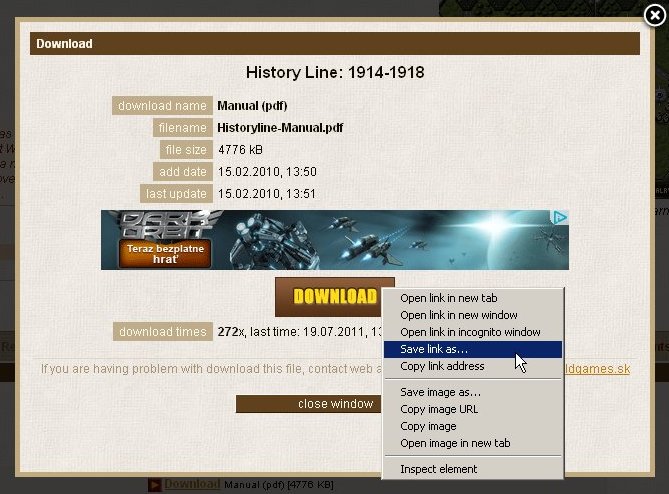
If you want to download a PDF file, it is recomended to use "Save link as..." is your browser. Especially in new Google Chrome.
In download pop-up window you must klick on big brown button DOWNLOAD with right mouse button. Then select "Save link as..." from menu.

Error message "File does not begin with %PDF-."
Solutions:
-
Disable the "Display PDF in Browser" option in your reader software:
- Use Start - Programs - Adobe Reader to run the program directly (instead of running Reader as an embedded function within the web browser).
- Pull down the Edit menu of the Reader and choose Preferences.
- In the Internet settings page, de-select (uncheck) the "Display PDF in Browser" option.
-
Use the "Save Target As" option to save the pdf to your computer's hard disk drive:
Is this a PDF file you viewed in Microsoft Internet Explorer? If so, I'll bet you used SAVE AS to save a copy of the file. Only, for reasons best known to Microsoft, it does NOT save a copy. It saves something useless instead. To save a PDF file in Internet Explorer, look at the page with the link: pop-up window with big brown button DOWNLOAD (before or after viewing the PDF). RIGHT click on the link. A menu will appear; select SAVE TARGET AS. On the Mac, press and hold the mouse instead of right clicking.
-
In Mozilla Firefox, disable the Adobe Acrobat plugin (Adobe PDF plug-in for Firefox and Netscape), and PDF download will be fine
How to run Old (exe) Packages on 64-bit systems (Windows Vista & Seven 64-bit)
OldGames.sk Windows installer (all older versions below 2.00) is designed only for 32-bit systems (XP/Vista/7)
The new version of installer (2.00 and higher) is fully support all 64-bit Windows systems
-
Download (exe) package from www.oldgames.sk
-
Rename package extension from .exe to .7z (like 7-zip archive)
-
Download 64-bit version of 7-Zip archiver, install it and unpack archive
-
Run game - execute .bat file #play.game.bat or #play.bat
How to run oldgames.sk (exe) Packages without installing
This applies only for old Package versions below 2.0. The new versions (2.0 and higher) are no longer possible to extract the files with 7zip.
If you don't have administrator rights on your system (Windows XP, Vista, Seven...), do these steps:
-
Download any (exe) package from www.oldgames.sk
-
Rename package name and change extension from .EXE to .7Z
-
Use 7-Zip archiver (or WinRAR) and unpack it to New Folder
-
Go to New Folder and execute file like "#play.game.bat" or "#Play.bat"
-
Play the game...


 slovak